
Recruitment agencies often need to prepare candidate CVs before sending them to clients. Different layouts, unnecessary personal information and inconsistent formatting can make profiles harder to review and compare.
A professional candidate profile solves this by presenting the most relevant information in a clear, consistent format. With CV formatting software for recruitment agencies, much of this process can also be automated.
What Is a Candidate Profile?
A candidate profile is a structured presentation of a candidate's experience, skills and suitability for a role.
Unlike an original CV, which is created by the candidate, a candidate profile is prepared with the client in mind. It can combine information from the CV with a recruiter summary, standardised formatting and agency branding.
The goal is to help the client quickly understand who the candidate is, what they can offer and why they are relevant to the position.
What Should a Candidate Profile Include?
A good candidate profile does not need to be long. It should make the most important information easy to find.
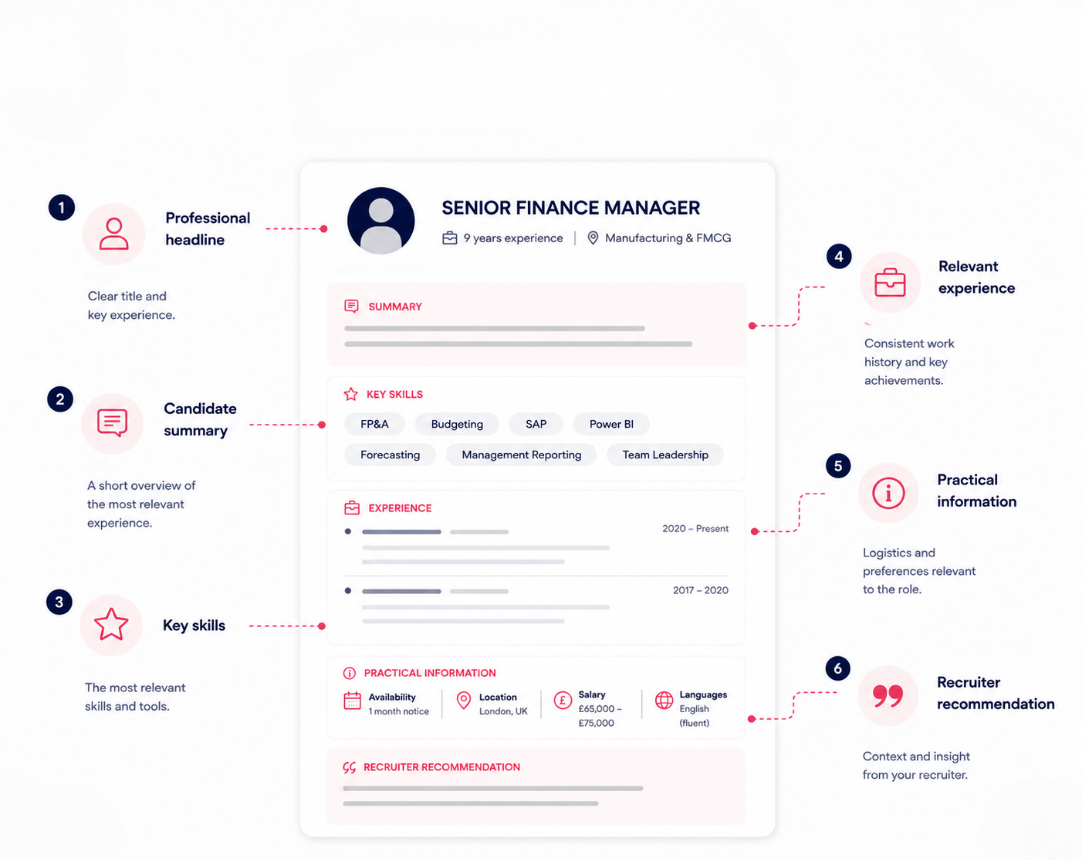
1. Professional Headline
Start with a short description of the candidate.
Example:
Senior Finance Manager | 9 years of experience | Manufacturing & FMCG
2. Candidate Summary
Summarise the experience most relevant to the vacancy in a few sentences.
For example:
Finance professional with nine years of experience across manufacturing and FMCG organisations. Experienced in financial planning, budgeting, management reporting and team leadership.
Keep the summary factual and avoid generic descriptions that do not help the client evaluate the candidate.
3. Key Skills
Highlight the skills most relevant to the role, for example:
- Financial planning and analysis
- Budgeting and forecasting
- SAP
- Power BI
- Team leadership
4. Relevant Experience
Present employment history in a consistent structure:
Job title
Company
Dates
Add a short description of the responsibilities and achievements that matter for the vacancy.
Standardising candidate CVs makes it easier for clients to compare applicants without navigating completely different document layouts.
5. Practical Information
Where relevant and appropriate, the profile may also include information such as:
- availability or notice period
- location or working preferences
- salary expectations
- language skills
Only include information that is necessary for the recruitment process and appropriate to share with the client.
6. Recruiter Recommendation
A short recruiter note can explain why the candidate has been shortlisted.
Example:
Strong match for the position due to extensive manufacturing experience, team leadership responsibilities and hands-on knowledge of financial planning and reporting.
This is where recruiters can add context that may not be immediately visible in the original CV.
Candidate Profile Example
A simple profile could look like this:
Senior Finance Manager
Experience: 9 years
Industry: Manufacturing, FMCG
Availability: 1 month
Summary
Finance professional with nine years of experience in financial planning, budgeting and management reporting. Currently manages a four-person finance team.
Key skills
FP&A, budgeting, forecasting, SAP, Power BI, team leadership.
Recruiter note
Strong fit for the role due to extensive manufacturing experience and current responsibility for financial reporting across multiple business units.
The exact format will vary between agencies, but the objective should remain the same: make the candidate easy to understand and compare.
Common Candidate Profile Mistakes
One of the most common mistakes is simply forwarding the candidate's original CV without any context or standardisation.
Other problems include overly long summaries, inconsistent layouts, irrelevant information and unsupported AI-generated claims.
Personal information also deserves attention. Depending on the recruitment process, agencies may want to remove certain details before sharing a profile. CV anonymisation can help create a more consistent approach to candidate presentation.
How to Automate Candidate Profile Creation
Creating profiles manually often means copying information between documents, adjusting formatting, removing personal details, adding branding and exporting the final version.
At scale, this becomes repetitive administrative work.
Talent Veil helps recruitment agencies automate CV formatting and candidate presentation. Agencies can turn different candidate CVs into consistent, branded and client-ready documents without manually rebuilding every profile.
This can help recruitment teams:
- standardise candidate presentation
- apply agency branding
- anonymise candidate information when needed
- reduce repetitive CV formatting
- create a more consistent client experience
Create Better Candidate Profiles With Talent Veil
A good candidate profile helps the client quickly understand why a candidate is worth considering.
For recruitment agencies, the challenge is creating these profiles consistently without spending unnecessary time formatting documents.