
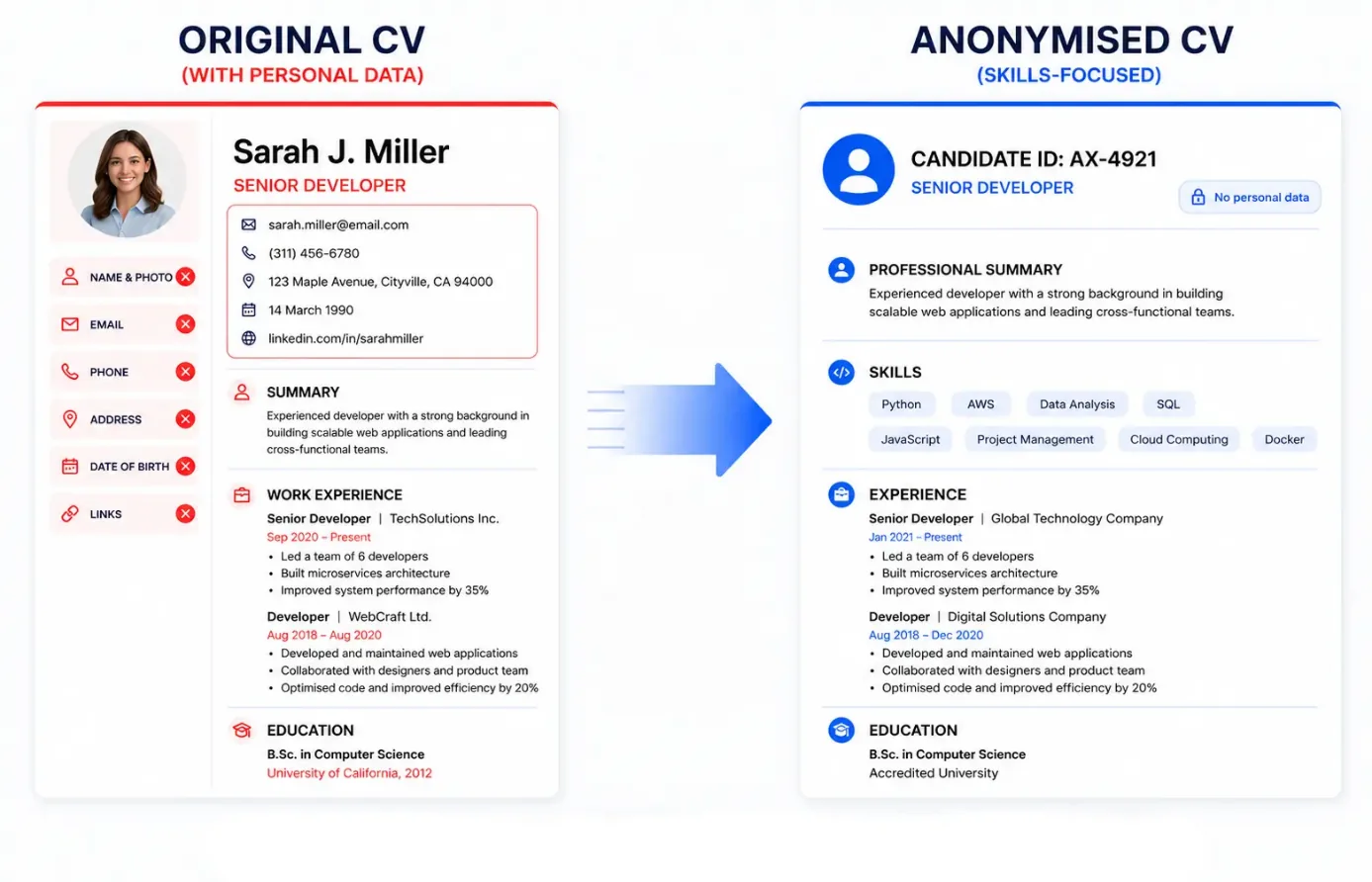
Step 1: Remove Personal Identifiers
Start by removing all direct personal information from the CV:
- full name
- photo
- home address
- phone number
- email address
- personal links (LinkedIn, GitHub)
- date of birth
These details are not needed for initial screening and often introduce bias before the candidate's qualifications are even read.
Step 2: Remove Demographic Signals
Next, review the CV for indirect signals that may reveal gender, age, nationality, ethnicity, religion, or marital status. This includes pronouns, certain memberships, or personal details that are not relevant to job performance.
Step 3: Review Education Details
Education should be handled carefully. You can:
- keep the degree and field of study
- remove exact graduation dates
- generalise institution names if they carry strong regional or demographic associations
Example:
- Before: University of Manchester, 2016
- After: Bachelor's degree in Psychology
Step 4: Anonymise Work History
Do not remove valuable experience. Instead:
- keep job titles and achievements
- remove company names if needed for client confidentiality
- generalise employer descriptions when specific names may introduce bias
Example:
- Before: Marketing Manager at Google
- After: Marketing Manager at global technology company
Step 5: Keep Skills and Achievements
This is the most important part of a blind CV. Ensure the anonymised version clearly shows:
- technical skills and tools
- measurable achievements
- results and impact metrics
Example: Sales Manager with 6 years of B2B SaaS experience. Increased pipeline by 35% and conversion rate by 18%.
Step 6: Assign a Candidate ID
Replace personal identity with a neutral label:
- Candidate #2418
- Applicant ID: TV-0932
This allows tracking candidates throughout the process without revealing their identity.
Step 7: Standardise the Format
All anonymised CVs should follow the same structure: candidate ID → summary → skills → experience → education → achievements. Consistency improves comparison and reduces bias introduced by formatting differences.
Step 8: Check for Hidden Identifiers
Personal data can still exist in:
- file names
- document metadata
- headers and footers
- embedded links
- references
A CV blinder can automatically detect and remove hidden identifiers, reducing the risk of accidental data exposure.
Step 9: Review for Usability
Before using the CV, ask: Is the experience clear? Are achievements measurable? Is the profile understandable without identity context? If not, you may have removed too much.
Step 10: Use a CV Blinder for Scale
Manual anonymisation works for a few CVs, but not at scale. Problems include slow processing, inconsistent results, missed data, and duplicate files.
A CV blinder automates the entire process. You can see how this works in practice on TalentVeil, where you can anonymise CVs in seconds for free.
Manual vs Automated Blind CV Creation
| Aspect | Manual | CV Blinder |
|---|---|---|
| Speed | Slow | Fast |
| Consistency | Low | High |
| Risk of errors | High | Low |
| Scalability | Limited | High |
Common Mistakes When Creating a Blind CV
- Removing too much information (losing performance context)
- Leaving hidden identifiers in file metadata
- Inconsistent anonymisation across candidates
- Relying only on manual processes at scale
When to Use Manual vs Automated Anonymisation
For small hiring processes with a handful of CVs, manual editing may be enough. But as hiring scales, consistency becomes critical. Automated tools deliver reliable results without adding administrative overhead — making blind hiring practical for teams of any size.